Tutorials
Fit supplied patterns
Rows contain effects and columns contain conditions. The following values are constructed examples.
import numpy as np
from jointshrink import set_data, fit, canonical_covariances

effects = np.array([
    [1.2, 1.0], [-1.1, -0.9], [0.1, -0.2],
    [1.5, 0.1], [-0.1, 1.4], [0.2, 0.1],
])
data = set_data(effects, 0.5, condition_names=["A", "B"])
patterns = canonical_covariances(data)
result = fit(data, patterns, scales=[0.25, 0.5, 1.0, 2.0])
print(result.format_summary())
print(result.posterior_mean)
print(result.interval(level=0.95))
posterior_mean estimates each effect after shrinkage. interval() returns equal-tailed marginal credible intervals. Both condition on the fitted covariance patterns and mixture weights. Check result.diagnostics["converged"] before interpreting a fit.
Learn sharing patterns
Strong rows help identify covariance patterns. Final mixture weights should instead use all rows or a representative training sample, because strong rows overrepresent large effects (Urbut et al., 2019).
from jointshrink import select_strong, cov_pca, cov_ed

strong = select_strong(data, z_threshold=2)
pca = cov_pca(data, n_components=2, subset=strong)
starts = {"PCA": pca["PCA_total"] + 0.1 * np.eye(data.n_conditions)}
learned = cov_ed(data, starts, subset=strong, maxiter=300)
patterns = {**canonical_covariances(data), **pca, **learned.covariances}
result = fit(data, patterns, scales=[0.25, 0.5, 1.0, 2.0])
print(learned.diagnostics["reason"])
Adding 0.1 makes this example's starting matrix positive definite; it is not a package default. Inspect the likelihood trace and stopping reason because covariance learning can reach a local optimum or its iteration limit.
Compare conditions
contrast = result.contrast([[1, -1]], names=["A minus B"])
print(contrast.posterior_mean)
print(contrast.interval())
sharing = result.sharing(mode="magnitude", factor=0.5)
print(sharing["matrix"])
print(sharing["denominator"])
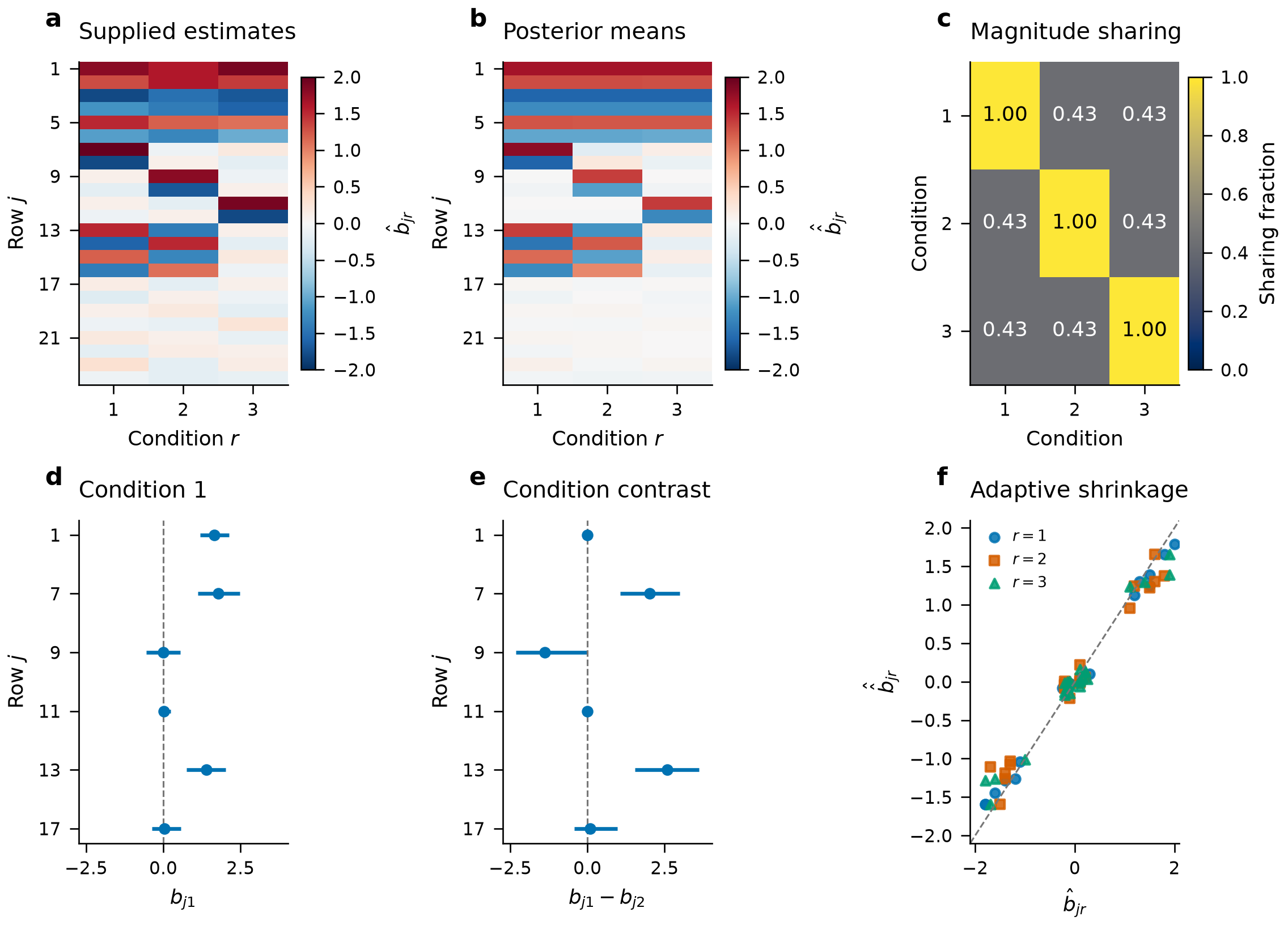
The contrast uses the joint posterior covariance. Magnitude sharing requires equal nonzero signs and posterior means within a factor of two. Each denominator counts rows with a selected error rate below the threshold in either condition. This proportion describes the fitted posterior means; it is not a posterior probability of sharing.
Reuse a prior
from jointshrink import fit_prior, save_prior, load_prior

prior = fit_prior(data, patterns, scales=[0.25, 0.5, 1.0, 2.0])
new_data = set_data([[0.8, np.nan], [-0.4, -0.6]], 0.5,
                    condition_names=["A", "B"])
new_result = prior.apply(new_data)
save_prior(prior, "prior.json")
restored = load_prior("prior.json")
for batch in restored.iter_apply(new_data, batch_size=128):
    print(batch.posterior_mean)
A missing effect uses NaN; its standard error must still be finite and positive. Inference uses observed conditions exactly. The unobserved effect is inferred from the fitted prior and the observed effects. Retain the same condition order and EE/EZ scale; reuse holds patterns and weights fixed.
Plot and export
from jointshrink import plot_intervals, plot_sharing

ax = plot_intervals(result, condition="A")
ax.figure.savefig("intervals.png", dpi=300, bbox_inches="tight")
ax = plot_sharing(result)
records = result.to_records()
# With pandas installed:
table = result.to_dataframe()
Plot functions return Matplotlib axes and do not display or save figures automatically.
Fit Student-t summary errors
Use a t scale matrix when summary errors have a specified heavy-tailed model. The following scale factors are not error standard deviations.
from jointshrink import set_data, fit_student_t

t_data = set_data([[1.2, 1.0], [-1.1, -.9], [.1, -.2]],
                  standard_errors=.5, condition_names=["A", "B"])
t_result = fit_student_t(t_data, df=5, scales=[.25, .5, 1., 2.])
print(t_result.posterior_mean)
print(t_result.diagnostics["quadrature_converged"])
print(t_result.diagnostics["quadrature_relative_change"])
The native multivariate likelihood shares one precision per row. Inspect
quadrature refinement and mixture-fit diagnostics before interpreting results.
Use t_result.shrink(new_data, df=5) to reuse this fitted Gaussian prior under
the t observation model.
Fit outcomes and predictors
Direct regression takes a numeric predictor matrix and outcomes. This example uses two predictors and a binomial success count. Trial counts are supplied at both fitting and prediction.
import numpy as np
from jointshrink import fit_logistic_regression

X = np.array([[-1., 0.], [-.5, 1.], [0., 0.], [.5, 1.], [1., 0.], [1.5, 1.]])
successes = np.array([0, 1, 1, 2, 3, 3])
regression = fit_logistic_regression(
    X, successes, trials=4, coefficient_names=["dose", "indicator"], seed=17,
)
print(regression.format_summary())
print(regression.diagnostics["split_rhat"])
print(regression.diagnostics["effective_sample_size"])
new_X = np.array([[0., 0.], [1., 0.]])
probability = regression.predict(new_X, scale="probability")
expected_successes = regression.predict(new_X, trials=4)
print(probability, expected_successes)
The predictor coefficients use a shared Gaussian-mixture prior. Unlike Gaussian
summary fitting, this model samples its mixture weights and coefficients.
Inspect chain traces and effective sample sizes before interpretation. For Gaussian outcomes, supply an appropriate
residual sigma. Negative-binomial dispersion, ordinal thresholds and Weibull
shape also remain fixed when those families are used.
Add group effects
Group labels add a random intercept. A random-design matrix can include an
intercept column and slope columns. A known group uses its retained effect
samples at prediction; use allow_new_groups=True to draw effects for a new group.
from jointshrink import fit_gaussian_regression

groups = ["A", "A", "A", "B", "B", "B"]
continuous = np.array([-.4, .1, .3, .8, 1.2, 1.5])
grouped = fit_gaussian_regression(
    X, continuous, groups=groups, sigma=.5, seed=21,
)
known = grouped.predict(new_X, groups=["A", "B"])
new_group = grouped.predict(new_X, groups=["C", "C"], allow_new_groups=True,
                            seed=22)
print(known, new_group)
Repeating label "C" keeps the same new-group effect within each posterior
draw. Omitting groups fixes group effects at zero; for nonlinear links this
is not a population-average response.
Fit censored event times
event=1 marks an observed event and event=0 marks right censoring. entry defaults to zero; supplied times must be nonnegative and strictly
smaller than observed times.
from jointshrink import fit_survival

survival = fit_survival(
    X, time=[1., 2., 2., 3., 4., 5.], event=[1, 1, 0, 1, 0, 1],
    family="cox", entry=[0., 0., .5, 0., 1., 0.], seed=31,
)
relative_hazard = survival.predict(new_X)
survival_probability = survival.predict(new_X, scale="survival", time=[1., 3.])
print(relative_hazard, survival_probability)
Cox survival uses a Breslow baseline for each retained coefficient draw.
Its intervals omit additional baseline-estimation uncertainty. Use
family="weibull", shape=... for a supplied Weibull shape and a full event-time
likelihood. See the API for categorical and
zero-inflated or hurdle count models.
Compare summary likelihoods
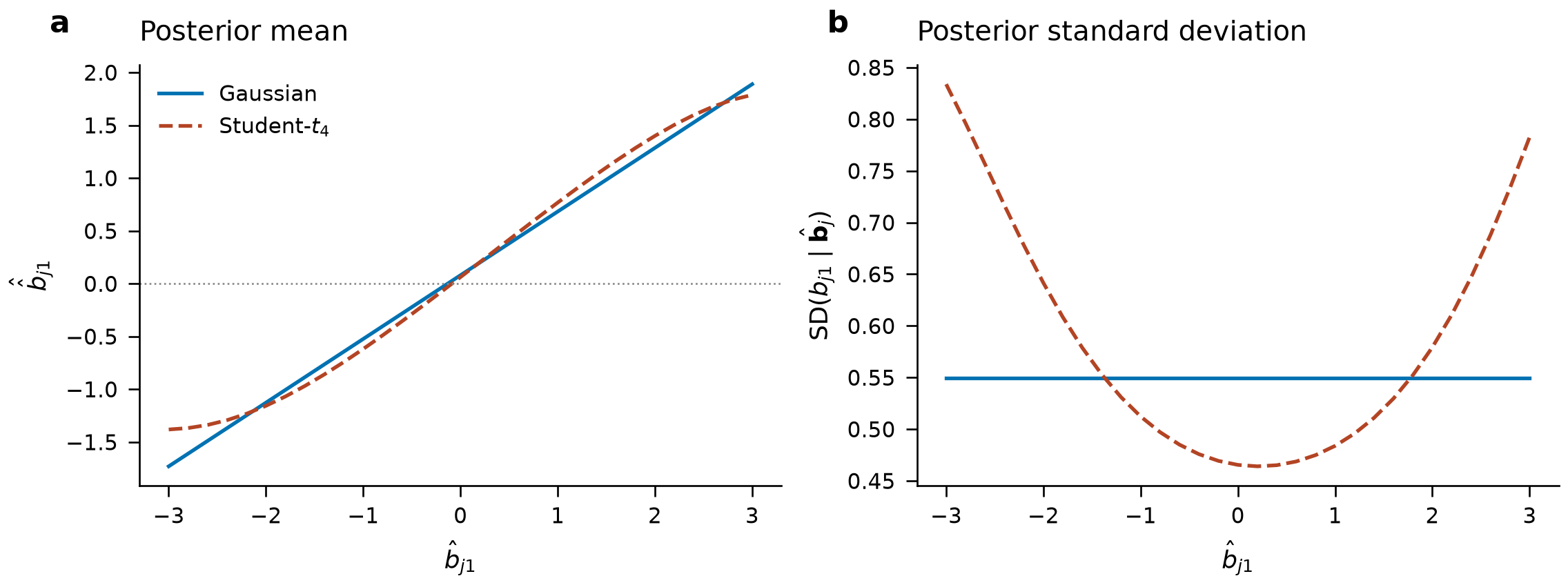
The two models use the same fixed prior and error covariance. Student-\(t_4\) scale is half that covariance. The first estimate varies; the second is fixed at \(0.5\). Posterior values retain the plotted results.
Inspect response curves
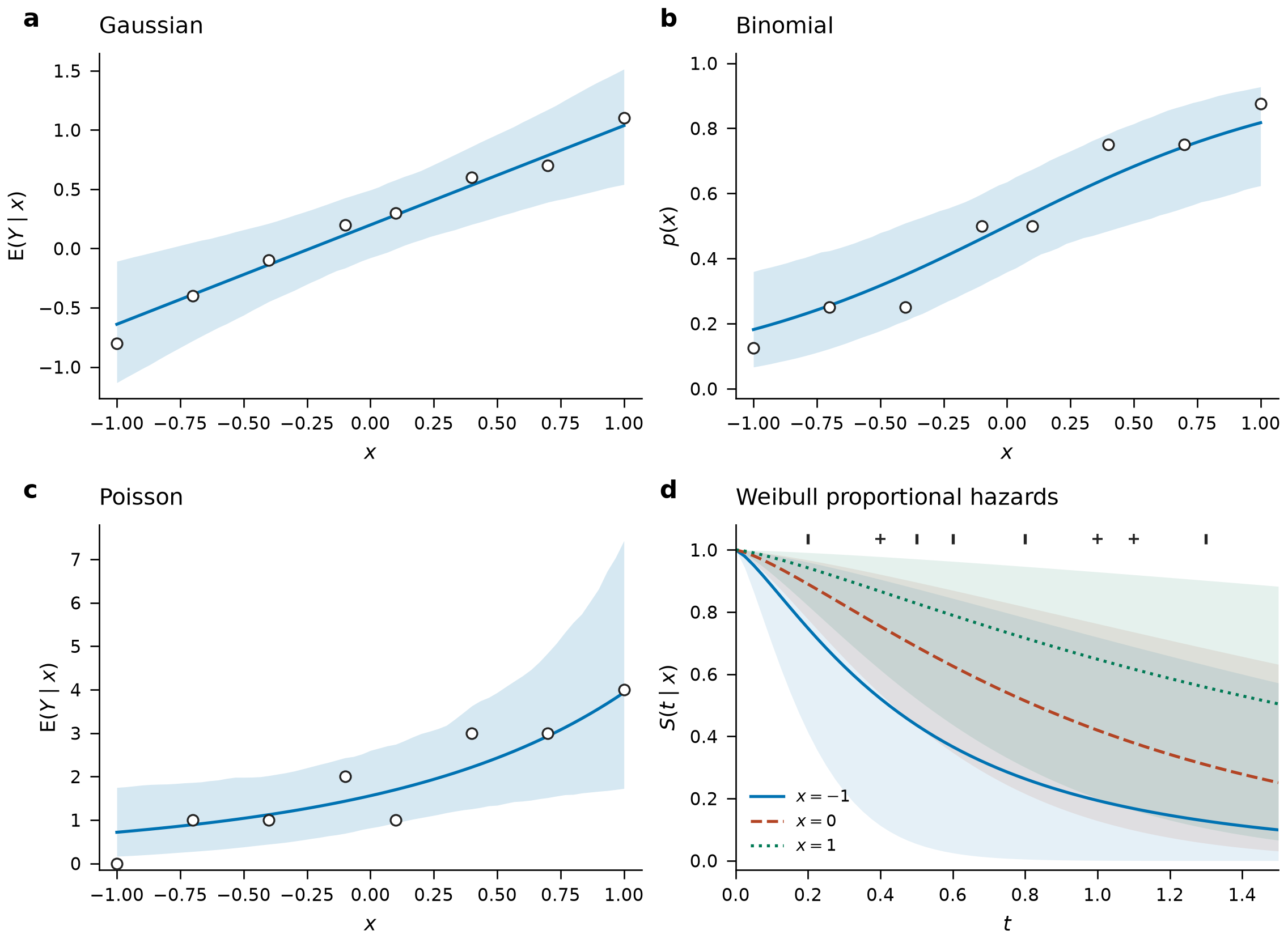
Each panel uses eight constructed observations and one predictor. Curves average posterior predictions; bands are 95% credible intervals for a conditional mean or survival probability. They are not future-outcome intervals. The survival panel marks event times with ticks and right-censoring times with plus signs. Inputs, predictions and settings describe the examples.